
Introduction
The United States is divided into geographic regions. You will be planning a trip to visit one state in each region of the United States. While in each state, explore some of the major attractions, historical sites, and learn about the state, its people, and its culture. You must keep track of your travels by completing an itinerary which outlines where you are going, how you will get there, where you will be staying, and what you will be doing. You will also have to create a budget for your trip, so spend your $20,000 virtual dollars wisely. The budget will keep track of your transportation, lodging, food, and entertainment costs. Your family and friends will want to know what you did on your trip, so you must keep an electronic journal about your travels, destinations, and what fun things you did while you were there. 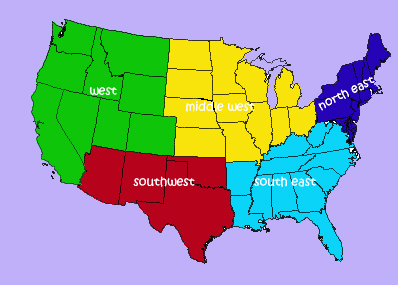
Process
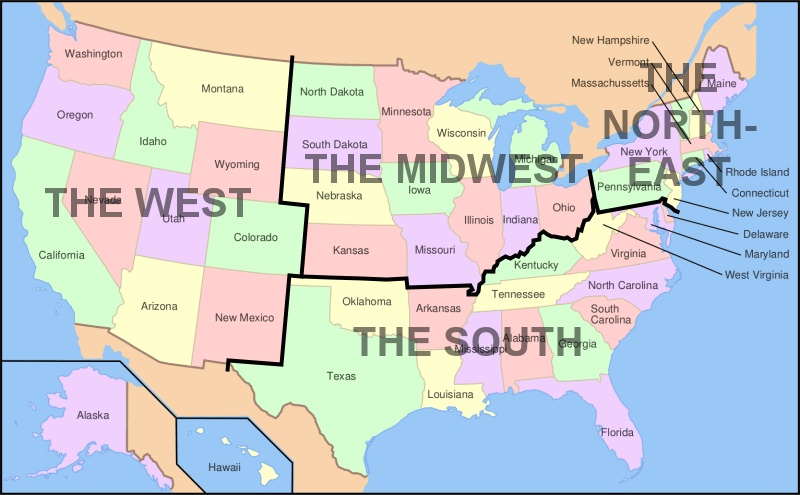
Getting started:
Study the map of the regions of the United States. Choose one state in each region to visit.
Starting and ending at your home state, draw your path of travel on your map and label the states you will visit.
Virtually travel:
-For each state, decide how you will travel. Fly, rent a car and drive, take the train, it is your choice. However, you will have to keep track of prices and it does come out of your $20,000 virtual money. You will also need to keep record of the your miles travelled.
-Identify the boundary information of each state.
-Research and determine at least two major attractions to visit.
-Locate and price accomodations to stay at during your visit.
-Record all information on the Itineray Worksheet for each location.
-Repeat for each state and destination.
-Complete the Budget Worksheet, which shows all of your expenses such as transportation, lodging, food, and entertainment. -Creat a Power Point of your travels so you can present it to your family and classmates when you return.
Evaluation
|
Conclusion
We hope you had a great time planning your virtual trip. There are a lot of interesting places to visit and we hope you had fun using the internet to find locations and entertainment, MS Word to record your travels, creating a budget, and creating your travel map.
Credits