
Introduction
So, that selfie you just took and posted on Snapchat, does it belong to you? "Standard terms of service in the social media industry include provisions that gives the companies, as well as their affiliates, a non-exlusive, worldwide, royalty-free, and transferabel lincense to all intellectual property that the use posts on teh website" (Storella, 2015, pg. 2046). Do you want people to know you posted it from a place of ill repute too? "In the age of digital information, controlling that information is becoming more and more difficult" (Studwell, 2016, pg. 226). As technology has become more avalible for more people to use and the increased measured of security we given up privacy for our saftey of ourselves and children. "School districts have contemplated using body cameras within schools, and some districts could soon allow school adminstrators to use them in disciplinary proceeding against students" (West, 2016,pg. 1533). Our personal property we give up to the world for ease and fun. "Participants [of social media] may be unaware of being recorded or participants may inldude private information about themselves or others" (Talab & Butlter, 2007, pg 13).
In our personal lives in addition to the educational world we haves a set of rules and regulations that protect ones rights to make, distrubute and use items. During this webquest you are going to be investigating intellectual property, copyright, fair use, and personal rights violation, and privacy. Below are definition of each of the previously mentioned terms and a few others that correlate to the topics.
Copyright: "[I]s the exclusive right of an author or other creator to make copies, license, and otherwise exploit a literary, musical, or artistic work, whether printed, audio, video, etc" (Allner, 2008,pg, 181).
Digital Millenium Copyright Act (DMCA): "[I]s the law that expempts youTube and other [Internet service providers] ISP's from liabilty from copyright claim and criminalizes the circumvention of digital right management (DRM) softward that protects DVDs from being copied" (Hobbs, 2016, pg. 51).
Creative Commons: "[H]elps you legally share your knowledge and creativity to build a more equitable, accessible, and innovative world — unlocking the full potential of the internet to drive a new era of development, growth and productivity" (Creative Commons, 2010).
Fair Use: "[I]s a resonable and limitd use of a copyrighted work without the author's permission, such as quoating from a book in a book review or using parts of it in a parody" (Allner, 2008, pg. 181).
Technology, Educatio, and Copyright Harmonization act (TEACH): “TEACH redefines the terms and condition on which accredited, nonprofit educational institutions throughout U.S. may use copyright protected materials in distance education-including on websites and by other digital means-without permission from the copyright owner and without payment of royalties” (Allner, 2016, pg. 184).
Intellectual Property: "[R]efers to creations of the mind, such as inventions; literary and artistic works; designs; and symbols, names and images used in commerce"(WIPPO).
Public Domain: "[Is] defined as belonging to th outside of teh intellectual property law system and as consisting of the material that is free for all to use and build upon" (Britton, 2010, pg. 65).
Task
Instructions
Review the resources below to gain a better insight on intellectual property, copyright laws, fair use, and personal privacy.
Intellectual Property
[video:https://www.youtube.com/watch?v=RQOJgEA5e1k]
https://www.law.cornell.edu/wex/intellectual_property
Copyright Laws
[video:https://www.youtube.com/watch?v=Tamoj84j64I&t=18s]
https://www.lib.purdue.edu/uco/CopyrightBasics/basics.html
[video:https://www.youtube.com/watch?v=5Q7y-3sVg3Q]
[video:https://www.youtube.com/watch?v=HKfqoPYJdVc]
Fair Use
[video:https://www.youtube.com/watch?v=Q_9O8J9skL0&index=3&list=PL8dPuuaLjXtMw…]
http://fairuse.stanford.edu/overview/fair-use/what-is-fair-use/
[video:https://www.youtube.com/watch?v=e6p_V3jQNzY]
Internet Privacy and Personal Protection
[video:https://www.youtube.com/watch?v=SCmKJyVx9AY]
https://digitalliteracy.cornell.edu/privacy/dpl5000.html
Process
The outline below is the process that I have used to make this WebQuest.
- Identify Content
- Content Message.
- Layout/ Sequence
- Identify Message Media
- Video
- Pictures
- Text
- Find sources
- Factual and Correct
- Reputable
- Interesting
- Follows Copyright Laws
- Citation
- Intext
- Credits
- Formating
- Size/ Font
- Spacing
- Color
- Reflection
- Modification
Evaluation
Reflection of Resources
Crash Course Intellectual Property- I like these videos, I find them to be very entertaining and well put together. I found that finding information on intellectual property to be the most difficult to find of all the resources, and this a great video.
Cornell Law- It was a very well writtne article that was short and concise. I feel that having two diffeent sources to teach about intellectual property was valuable.
Crash Course Copyright- I used this video for the same reasons as the other one. Plus, these videos are very up to date in respect to filmograpy unlike some of the other videos.
Purdue Copyright Basics- It very well written and laid out, containing a lot of white space. All of the information was correct and to concise, plus being able to incorporate information from my alma mater makes me proud.
Digital Millenium Copyright Act Video- This video was the best most professional done video I could find. The video is very concise but convers all major aspects of the act.
DMCA Excutive Summary- The resources is produced from the U.S. Copyright office. This resource was choosen because it was written and in a different from a webpage. This sources gives a wide range of details about the topic.
Creative Commons- This video is very entertaining and one of the best videos to give information on creative commons. This is one of the topics I find the most difficult to understand this video in combination to with the creative commons website to help clear up some of the confusion.
Crashcourse: Copyright, Exemptions, and Fairuse- This video does a great job explaining expemptions and fairuse, while being entertaining. Though, I did not want to use a third video from this series I find the quality production of the video to be a valuable attribute.
Stanford University "What is Fairuse"- This is another site that is great in content, concise, and from a reputable source. Used a websight to break up the videos.
TEACH ACT.mov- This video gives a lot of details about the TEACH act and how it coresponds to the world of education. This is probably the worst video on that I found among factors such as professional, entertaining, and reading. There were not a lot of videos describint the TEACH act.
TEACH Act Highlights- Another non-video sources comming from a reputible sources. The source being the National Education Association helps teachers know and understand how the law will affect and help teachers.
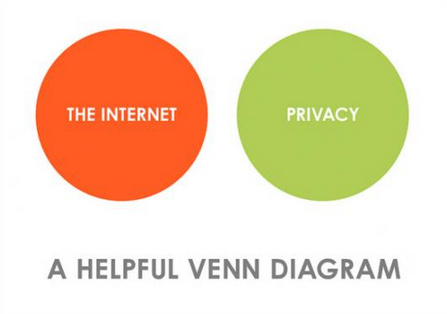
Internet Privacy Venn Diagram- I find this diagram to be hummorious and truthful. This diagram illustrates how we do have privacy while online.
Online Privacy: How did we get here?- This video shows how we have given up our privacy in order to make life easier, simpler, and more conected. This is a great resource from another great reputible source that demonstrates what we have given up for more ease within our world.
Privacy and the Internet- This source is another text source so one can read the information instead of watching a video. This helps explain to students that no matter what they do online their is a digital footprint and that people need to be careful for their own protection.
Conclusion
Within the Webquest we have looked at different copyright laws including the DMCA, TEACH act, and Creative Commons, how one can claim fair use of using of copyrighten materials, and how personal rights and privacy. These are all important laws and concepts for both educators and creators to understand. Builing a knowledge base will help protect oneself and their ideas from theft, and from piracy. Copyright laws help people maintain the right to their works, while helping with the advancement of science and educaiton.
Credits
References
Allner, I. (2008). Copyright and the Delivery of Library Services to Distance Learners. Internet Reference Services Quarterly, vol. 9 (#3-4). Retrieved from http://www.tandfonline.com/doi/abs/10.1300/J136v09n03_13. BrickPress. (2012). Creative Commons License and how it helps us share digital content. Retrieved from https://www.youtube.com/watch?v=HKfqoPYJdVc. Britton, M. (2010). Moderizing Copyright Law. Texas Intellectual Property Law, vol. 20 (#65) 65-114. C. (2015). Introduction to Intellectual Property: Crash Course IP 1. Retrieved November 18, 2016, from http://www.youtube.com/watch?v=RQOJgEA5e1k Copyright Basics: Crash Course Intellectual Property 2. (2015, April 30). Retrieved November 18, 2016, from https://www.youtube.com/watch?v=Tamoj84j64I&t=18s Copyright, Exceptions, and Fair Use: Crash Course Intellectual Property #3. (2015, May 7). Retrieved November 18, 2016, from https://www.youtube.com/watch?v=Q_9O8J9skL0&list=PL8dPuuaLjXtMwV2btpcij…; Copyright - Highlighted Words and Phrases. (n.d.). Retrieved November 19, 2016, from http://www.thebluediamondgallery.com/highlighted/c/copyright.html Digital Mellennium Copyright Act. (2012, November 21). Retrieved November 20, 2016, from https://www.youtube.com/watch?v=5Q7y-3sVg3Q Goldbach, B. (2011, July 30). The Internet and Privacy: Venn Diagrams simplify truths. Retrieved November 19, 2016, from https://www.flickr.com/photos/topgold/5989796586 Hobbs, Renee. “Lessons in Copyright Activism: K-12 Education and the DMCA 1201 Exemption Rulemaking Process.” International Journal of Information and Communication Technology Education, vol. 12, no, 1, 2016, pp. 50-63. Oviatt Library Information Literacy Toolkit. (n.d.). Retrieved November 20, 2016, from https://moodle.csun.edu/mod/book/view.php?id=1897323 P. (2013). Online Privacy: How Did We Get Here? | Off Book | PBS Digital Studios. Retrieved November 19, 2016, from http://www.youtube.com/watch?v=SCmKJyVx9AY Storella, A. (2015). It's Selfie-Evident: Spetrums of Alienability Copyright Conten on Social Media. Boston University Law Review, vol. 94 (#2045) pg. 2045-2088. Studwell, R. (2016). The Notion and Practice of Reputation and Professional Identity in Social Networking: From K-12 Through Law School. Kan J.L. & Pub Poly, vol 25 (#2) pgs. 225-272. Talab, R., S. & Butler, R., P. (2007). Copyright and You: Shared electronic spaces in the classroom: Copyright, privacy, and guidelines. TechTrends, vol 51, (#1) pgs 12-15. TEACH Act Highlights and Resources. (n.d.). Retrieved November 20, 2016, from http://www.nea.org/home/35377.htm tkOus (2010). TeachAct.mov. Retrieved from https://www.youtube.com/watch?v=e6p_V3jQNzY. U.S. Copyright Office Summary. (1998). Digital Millennium Copyright Act. West, S., P. (2016). They['ve] got Eyes in the Sky: How the Family Educational Rights and Privacy Act Governs Body Camera Use in Public School. American University Law Review, vol 65 (#15330 pg. 1533-1567. What is Intellectual Property? (n.d.). Retrieved November 15, 2016, from http://www.wipo.int/about-ip/en/
Teacher Page
The following are a list of tips I would reccommend for anybody who would like to make a Webquest.
1. If you are not used to the format of Webquest editor, make everything on Word, and then use the Word past botton. It is button with a clipboard with the blue W. Items do not cleanly copied from word to the editor box without using the clipboard.
2. You must always change the size fo the font in each text box, and sometime multiple time while in the same box. I would recommend and then highlight all text and change all of it to the desired size once you are done typing.
3. When you are trying create spacing you may need to type in some spacing to get your desired spacing.
4. If you need to indent to the left you need to hit the outline botton.
5. When inserting pictures if you cannot see the pictures you will need to set them to orginal or preview size.