
Introduction
Let’s face it – no matter how excited you are about a new project or priority in your life, there will always be days when your motivation lags. Days when – despite all the progress you’ve made in the past – it just sounds easier to sit on the couch playing video games than to buckle down and crank out the work needed to meet your goals.
But learning Java with this method is easier and more pleasant than you think.
So push yourself because, no one else is going to do it for you. Learn Java , get funny with doing it and be the first.

Task
ATTANTION: When you finish doing exercises go to mooshak and check is it correct or not!!!
Task 1
Write a program to sort Employee objects based on highest salary using Comparator.
Create a LinkedList using user defined objects (Ex: Employee). By using Collections.sort() method you can sort the LinkedList. You have to pass Comparator object which contains your sort logic.
Task 2
N1
- Create your own NetBeans project named as MyHashSet
- Create your own HashSet object with initial capacity of 5
- Add the following objects to the newly created HashSet object
Display the HashSet object - 2 String objects
- 2 MyOwnClass object (You will have to create MyOwnClass.java first)
- 3 Integer objects
- Display the HashSet object
Use "Main.java" for following exercises:
|
N2
Modify Main.java as following
- Create your array of Strings called myownnames[] with duplicates
- Create a HashSet object from the array and display it and make sure there is no duplcates in the set.
N3
Modify Main.java or create your own project as following
- Create your array of Strings called myownnames[] with duplicates
- Create two HashSet objectts and use removeAll() method to remove items that have duplicates from the original set.
- Display the two HashSet objects
Task 3
N1
Write a program to iterate through an ArrayList.
Some Help : All of the collection classes provides iterator() method to iterate through the collection. The iterator() method returns the Iterator object through which you can access the collection elements in an order. Enumeration also does the same purpose. The difference between Iterator and Enumerations is: Iterators allow the caller to remove elements from the underlying collection during the iteration with well-defined semantics.
N2
Create a program and implement the following:
A. Create a vector with another collection (Ex: ArrayList) object and iterate through vector using Enumeration object.
B. Write code to copy all elements of a vector object to an array and use the enhanced for loop to transverse through all the elements of an array.
Some Help : The Vector class implements a dynamic array of objects. Like an array, it contains components that can be accessed using an integer index. However, the size of a Vector can grow or shrink as needed to accommodate adding and removing items after the Vector has been created.
Task 4
N1
create a program and implement the following:
A. Write a program for copying an another collection (Ex: LinkedList) instance objects to existing ArrayList.
B. And also write code for copying all the contents of ArrayList to an array.
C. And reverse ArrayList contents. You can reverse the contents by calling Collections.reverse() method. You have to pass ArrayList instance to this method, which reverses the content.
Some Help : ArrayList is a resizable-array implementation of the List interface. Implements all optional list operations, and permits all elements, including null. In addition to implementing the List interface, this class provides methods to manipulate the size of the array that is used internally to store the list. (This class is roughly equivalent to Vector, except that it is unsynchronized.)
Task 5
N1
Write a program and get all key-value pair as java.util.Map.Entry objects. java.util.Map.
A. Entry class provides getter methods to access key-value details.
B. The method entrySet() provides all entries as set object.
C. Use enhanced for loop to transverse through all the elements of Set.
Process
At first , if you want to be succsesful and do every task with best results , you have to know some java basics.
Here you can remember what you already know:
http://docs.oracle.com/javase/tutorial/java/index.html
If you don't know What Is Java Collections , then go down and read.

Task 0
Create a new Java project called com.vogella.java.collections. Also add a package with the same name.
Create a Java class called Server with one String attribute called url.

Create getter and setter methods for this attribute using code generation capabilities of Eclipse. For this select Source → Generate Getters and Setters from the Eclipse menu.
Create via Eclipse a constructor which gets a url as parameter. For this select Source → Generate Constructor using Fields... from the Eclipse menu.
Type main in the class body and use code completion (Ctrl+Space) to generate a main method.
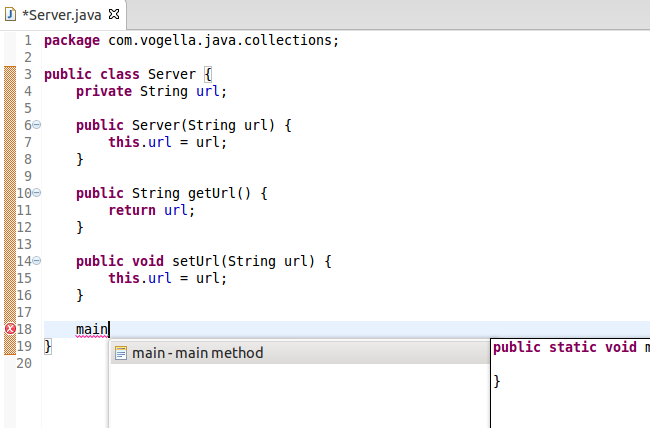
In your main method create a List of type ArrayList and add 3 objects of type Server objects to this list.

Use code completion to create a foreach loop and write the toString method to the console. Use code completion based onsyso for that.
Run your program.
Use Netbeans to create a toString method based on the url parameter and re-run your program again.
There are some useful links for you :
1. Introduction to Collections2. Interfaces3. Aggregate Operations4. Implementations5. Algorithms6. Custom Collection Implementations7. Interoperability
Evaluation
gfhffghfgh
Conclusion
Congratulations! Now you just know Java collections. Do the best and never give up!
Teacher Page
By Mariam Tchutchulashvili
Master student in Polytechnic Institute of Bragança