
Introduction
My Excel Shopping Assignment
by
Mrs. Grant
Good day students! Here is your assignment!
Your parents did not buy your school supplies yet and school starts next week! Your prent gave you $150.00 to buy the school supplies that you need!
(click on TASK)
Task
Directions: Here is your school supply list. Remember that you only have $150.00 to shop with. Choose the supplies that you need the most and do not spend more than you have. Type the name and price of the supplies that you chose using Google sheets. Make sure that you have:
1. Your title (School Supplies)
2. Items in Column A and prices in Column B
3. Under all of the prices in Column B type the total amount of money that you spent and how much money you have left over. (See the example below).
4. Type Allowance in Column A7.
5. Type Total Expences in Column A10, A11.
6. Type "Money Left Over" in Column A12. (Cell Addresses man vary)

Process
Use Google Sheets for this assigment.
Click on the video and watch first,
Then scroll to the bottom and follow the directions.
[video:https://www.youtube.com/watch?v=YNfTCXBh9W0 align:right autoplay:1]
Step 1: Open www.google.com
Step 2: Sign in to your Gmail account
Step 3: Go to your Google apps and locate your google drive.
Step 4: Click on NEW or CREATE on the left side of your screen. (see the picture below)
Step 5: Click Google sheets! NOW YOU ARE READY TO BEGIN!

Evaluation
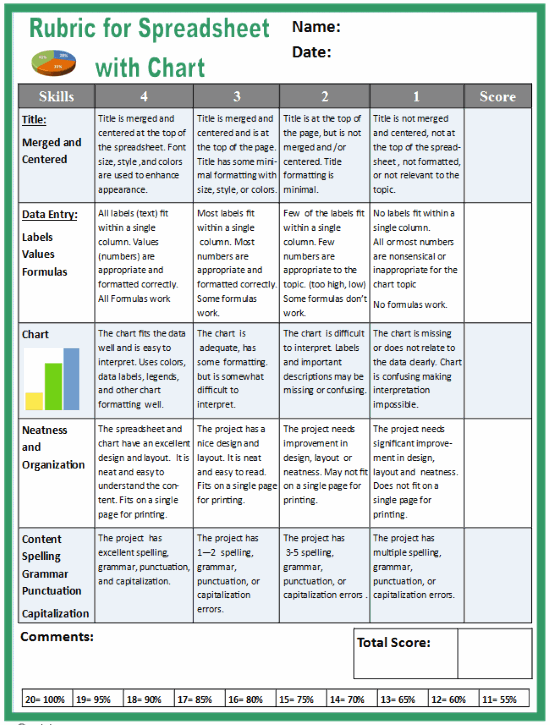
Here is your rubric. This is how I will grade you.
Conclusion
I hope that this project taught you about budgeting your own money while improving your computer and math skills.